
How to: Relieve Thumb Pain with Remote Play on PS Vita
Remote Play PS Vita Guide to relieve thumb pain while gaming. Avoid repetitive strain injury by using remote play and improve performance with thumb supports.
Avoiding Thumb Pain and Optimising Performance on PS Vita Remote Play
Gamers chasing improvement performance often begin to feel thumb pain as playing levels increase. Remote play of PS Vita can see an upturn in performance and ease thumb pain using a game control mount to connect a PS Vita to a DualShock 4 controller and PlayStation 4.
This article details the latest information on using a game control mount via ps vita to take the strain off the hand and improve gameplay. Making gameplay comfortable for long periods in any positions!
Remote play is a great way to enjoy the latest games on PlayStation, however excessive and prolonged gameplay can cause thumb and finger pain. Using the game mount for ps vita remote play can take some of the strain off the thumb joints.
Over time, repetitive actions and forces can strain the tendons and joints in the thumb causing them to ache and become stiff. Rather than interrupt gameplay, improving hand position is the simple fix to maintaining gaming performance
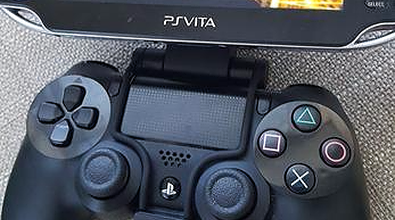
Ultimate PS Vita Remote Play is simple to setup:
PS Vita:
You’ll need yourself a PS Vita.
DualShock 4:
On its own the PS Vita can remote play with a Playstation 4, however, the location of the L2/R2 and L3/R3 buttons make it somewhat tricky to play all but the most simple games.
Game Control Mount:
This device was developed by Sony to attach a smartphone to a controller for a remote play experience. However, we're going to make it fit to the PS Vita.
Caution is recommended against the admittedly cool-looking PS Vita holders which attempt to change the PS Vita into the more familiar Dualshock 4 shape. Now, while more useful than not having it, it doesn't compare to being able to use a Dualshock 4 controller. If you're getting wrecked in online play due to bad PS Vita controls then you only have yourself to blame unless you follow our guide.
Alongside the remote set-up, a thumb support holds the thumb in a steadier position while you play. To be straight with you: it will not make repetitive strain impossible and we are not going to claim it does. What it does is stop the thumb wandering into the positions that tend to aggravate it, which is the bit you cannot think about while you are actually playing.
Thumb Supports help with thumb position for quick-firing, rapid movements and support the hand and wrist to play in any position, on the bed, in your gaming chair, on the train or on the beach!
The honest pitch: a supported thumb is a more comfortable thumb over a long session. If your hands are already sore before you sit down, the real fix is shorter sessions and a break every so often, and if pain keeps coming back after you stop playing, get it looked at rather than strapped up.

Our thumb support has a metal bar running through it that holds the joint in a settled position, so it is resting rather than working while you grip.

Keep reading
How to Fit a Hinged Knee Brace [Video]
Physiotherapist advice on fitting an Essential Wellness Hinged Knee Brace [video].
Ankle Brace: Features, Benefits and Use Cases [Video]
Physiotherapist advice on the features, benefits and use cases of an Essential Wellness Ankle Brace.
What is Tennis Elbow | Detailed guide for those with the condition
Read about the main causes of tennis elbow, how long you can expect it to last, how to treat tennis elbow and when you should go see your GP for it.